Introducing Analyst
Delegate your daily GTM questions and analyses.
With live data from Salesforce, HubSpot, and Stripe.
Designed and built by
 Mike Stewart
 Jamie Osler
 Robert Long
 Tony Poor
1. Analyst
This isn’t (just) a chatbot.
Ask a question. Analyst builds the model.
How many meetings have our SDRs booked in the last three months?
How has our churn been trending over the last year?
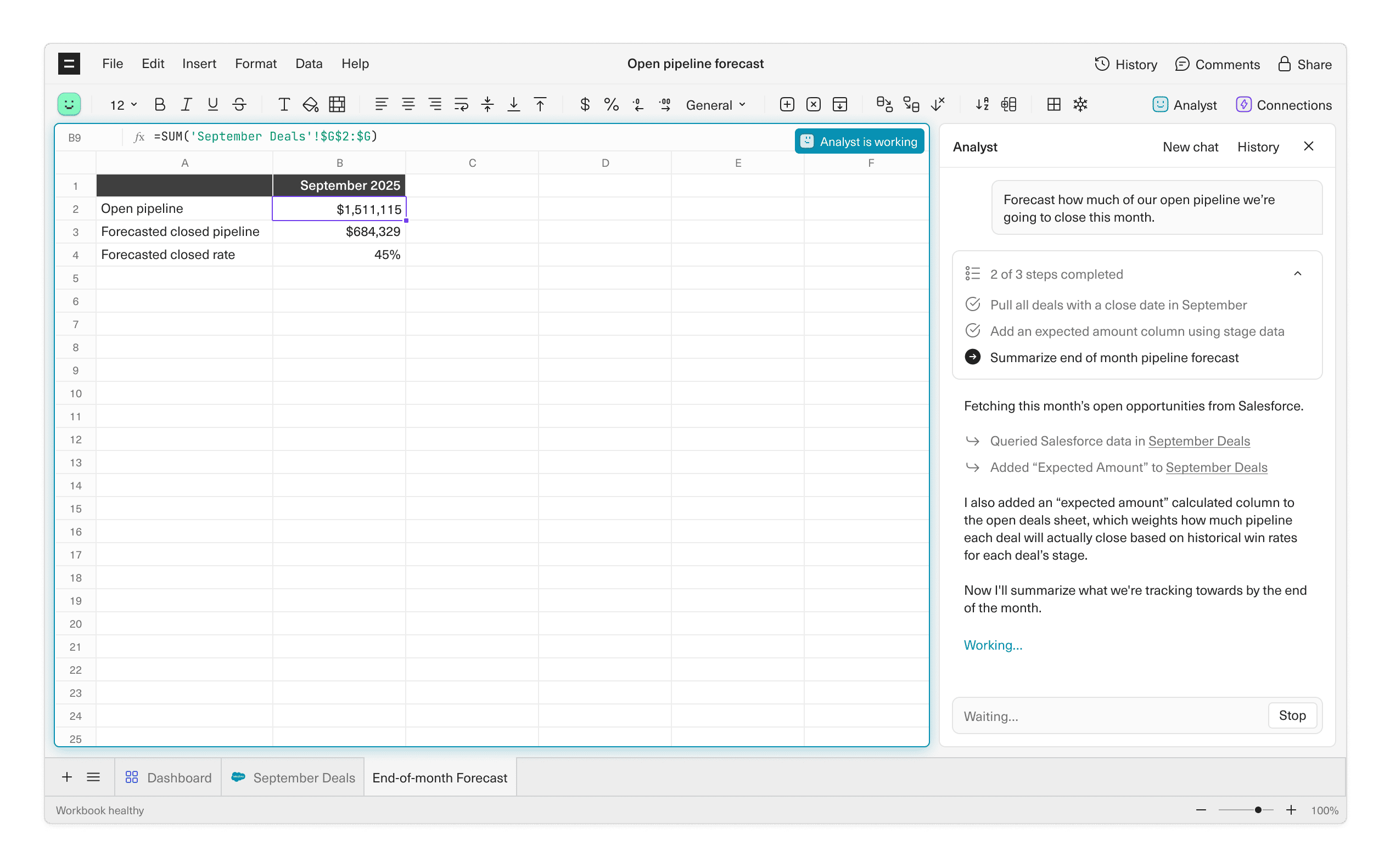
Forecast how much of our open pipeline we’re going to close this month.
What’s our pipeline coverage for Q1?
Show me ARR growth by cohort.
Which deals are at risk of slipping this quarter?
How many meetings have our SDRs booked in the last three months?
I'll pull all booked meetings from Salesforce for the last three full months, and include the meeting booked owner.
Now I'll build a monthly summary broken down by SDR. I'll include total pipeline generated, in addition to number of meetings booked.
How has our churn been trending over the last year?
Pulling daily churn metrics from Stripe into a new data sheet, spanning the last 12 months.
Next, I'll build a monthly churn summary with that data, showing churn over time in both ARR and customer count.
Forecast how much of our open pipeline we're going to close this month.
Fetching this month's open opportunities from Salesforce.
I also added an "expected amount" calculated column to the open deals sheet, which weights how much pipeline each deal will actually close based on historical win rates for each deal's stage.
Now I'll summarize what we're tracking towards by the end of the month.
What's our pipeline coverage for Q1?
I've pulled your Q1 quota ($2.4M) and summed all open pipeline with Q1 close dates.
Now calculating the coverage ratio. This divides open pipeline by quota to show how much buffer you have.
Show me ARR growth by cohort.
Pulling all subscriptions from Stripe, grouped by the month customers first signed up.
Now building a cohort table showing how ARR grows for each signup month over time. Each row is a cohort, each column shows their ARR at month 1, 2, 3, etc.
Which deals are at risk of slipping this quarter?
I've pulled all 23 open deals with Q1 close dates from Salesforce, and calculated days since last activity.
Now I'll flag deals as at-risk based on: no activity in 14+ days, close date within 30 days, or stuck in same stage for 21+ days.
2. Platform
A foundation designed for trust.
Every answer is calculated in a spreadsheet, with logic you can inspect, modify, and trust.
No AI math
Analyst avoids hallucinations by never doing math. It only pulls data and writes formulas.
Tuned for B2B
We taught Analyst how SaaS and AI teams actually report on their business.


Analyst
Trained to answer questions about SaaS and AI.

Spreadsheet
All answers calculated in a spreadsheet.

Warehouse
All your GTM data synced and cleaned in a Snowflake instance we run for you.

Analyst
Trained to answer questions about SaaS and AI.

Spreadsheet
All answers calculated in a spreadsheet.

Warehouse
All your GTM data synced and cleaned in a Snowflake instance we run for you.
3. Testimonials
Analyst is at work today.
Trusted by real teams, making real decisions.
“You guys cooked with this one. This is better for viewing data than anything Salesforce has built—it answers real business questions and makes the data easy to act on.”

Connor Nowinski
VP Finance, 11x

“Questions like ‘pipeline by AE and deal type’ used to mean long Slack threads. Now I ask a question and get an answer in minutes—no SQL, no back-and-forth.”

Joe Ryan
CRO, Expo

“Analyst cut our data preparation and analysis time by over 90%, shifting our team’s focus from data wrangling to insights and strategy.”

Dean Anderson
Strategy + Ops, Thanx

“A big part of my job is fielding daily data requests. What used to take an hour now takes about 10 minutes, and all I need to do is give Analyst a few clarifying prompts.”

Katie Taylor-Kramme
Operations, Atticus

Put Analyst to work.
Get clear, trustable answers to your daily GTM questions. In minutes.

Frequently asked questions
Reach out to our team or book a demo to start using Analyst.
Analyst is designed to deliver results in a spreadsheet pulling from live data. You must have an Equals subscription in order to use Analyst.
Analyst requires no additional setup once your Equals workspace is live.
Analyst only generates SQL queries and spreadsheet formulas. All calculations happen directly in the spreadsheet, so every result is transparent, auditable, and trustworthy.
Equals is a GTM analytics platform with everything built in: managed data warehouse, syncing, modeling, and a spreadsheet for analysis. Explore and share insights through live spreadsheets, dashboards, Slack, and email.